Start-up & Operation
POOL PREPARATION
To achieve optimal performance the pool must be as clean as possible.
Backwash or run pool filtration continuously for 24 hours prior to starting the AOP System.
Super-chlorinate the pool water using a chlorine-based shock treatment so the water has a sustained 1-3 ppm free chlorine level.
Test pool chemistry and adjust pH between 7.4 and 7.6. Adjust total alkalinity between 80 and 120 ppm.

SYSTEM START-UP
Check electrical connections at breaker box.
Turn on pool circulation system and the Smart Status LEDs will turn on automatically.
SMART STATUS INDICATORS
The DEL AOP has indicator lights to indicate its working condition. The lights should display the correct colors after the pump has reached steady flow: Green for power, Blue for Ozone and Purple for UV-C. In the next step you can see a complete chart of possible Status lights
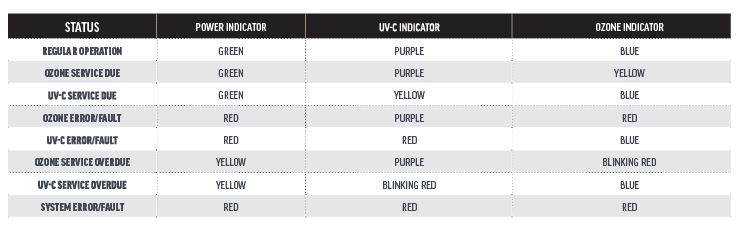
Understanding Smart Status
The Smart Status Indicators make it easy to quickly check the operation status of the system. In general, Yellow means a system needs your attention and Red means a system is not operating.

System Shut-Down
The system will turn off automatically when the pool system is off or when flow stops.
To completely shut down the unit for service or storage:
Shut off power at the breaker.
Shut off water to the unit.
Congratulations! You have completed this chapter. To go to the next chapter, click next. To go back to the Chapter Table of Contents, click done.
Do you need more help? You can find the best way to contact our team by clicking here.